...
The information on this page refers to License Statistics v6v7.23 3 and newer, which introduced cache statusadded a License Exceeded status and an "invalidate cache" action for individual license servers. If you are using a version previous to v7.3, see documentation for previous versions. |
Cache preparation is a fully automated, background process that allows historical reports to be generated more quickly, rather than calculating the reports on demand. However, cache preparation may occasionally fail due to inconsistent data in older databases.
You can review the cache status in report grids or from the Cache tab in the Administration: License Servers page to check that the cache preparation has been successful, as described below.
...
License Statistics system administrators can review the cache status for license servers from the Cache tab in the Administration: License Servers page.
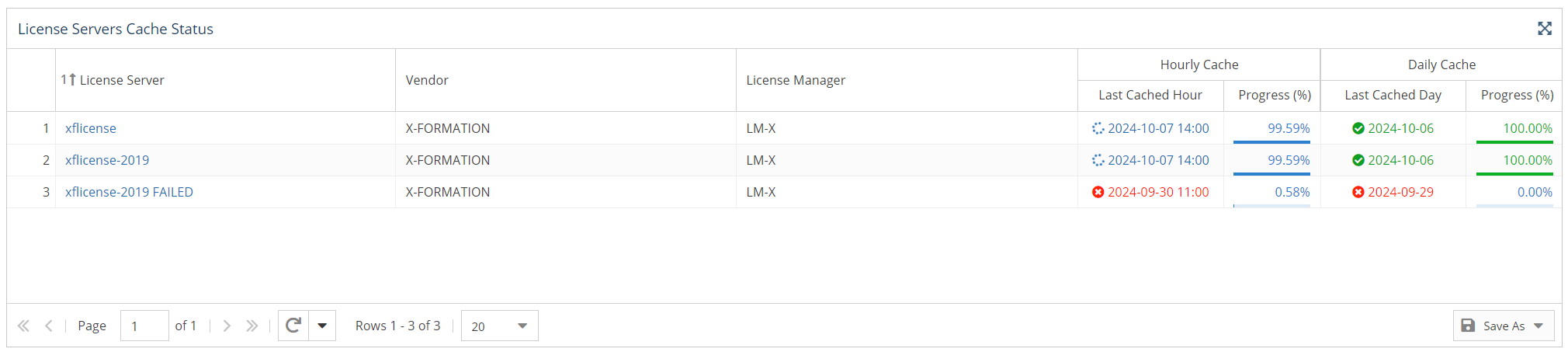

The License Servers Cache Status grid includes both hourly and daily cache status information:
...
- Green status: Cache up to date; reports using the server data and time range are available
- Blue status: Cache preparation in progress; reports temporarily unavailable
- Red status: Cache preparation failed (details are available by hovering . Hovering over the status ); reports shows the cause of failure, such as "License Exceeded." Reports that are generated using the cache will not be available until the problem is resolved.
| Anchor | ||||
|---|---|---|---|---|
|
Above the License Servers Cache Status grid, there is a Delete Cache button that allows you to clear the cache. For more details on deleting the cache in order to fix issues with cache preparation, see Cache invalidationIn addition to providing cache status, the Cache tab in the Administration: License Servers page includes the ability to invalidate the cache. Cache invalidation is a process that clears the reports cache, which X-Formation Support may advise for helping to resolve inconsistencies in cached data.
| Warning |
|---|
Clearing Invalidating the cache should be done with caution. Clearing the reports cache is usually performed only when requested by X-Formation Support to help resolve inconsistencies in cached data. Although clearing invalidating the cache is in itself a quick process and no data will be lost, reports will be unavailable while the cache is re-created, which may take a few hours for larger databases. |
For complete details on invalidating the cache, see Cache invalidation.