...
The information on this page refers to License Statistics v6v7.24 2 and newer, which added the "ID" column to reservation grids and improved consistency of other grid labels. If modified the UI for working with License Statistics feature reports. If you are using an earlier version, please refer to the documentation for earlier versions. |
The Reservations page under the Features: Realtime section in the left navigation pane gives you an overview for all reservations for the selected feature or all features. See License Reservations for more information about which license servers support reservations.
General Information
The General Information area at Use the License Server and Feature pick lists at the top of the page includes identifying information for the feature and lets you select all features or individual report to select specific license servers and features for which to view reservations.current usage. You may also choose to view all license servers, or all features for a selected license server by selecting "All" from the pick lists. (When "All" is selected from the License Servers pick list, feature selection is unavailable.)
You can add the Realtime Reservations report's chart and grid to the License Statistics Dashboard using the pin at the top right of the pane. Learn more about customizing the Dashboard.
Realtime Feature Reservations grid
The Realtime Reservations grid shows the reservation information for all features or the individually selected license server and feature(s).
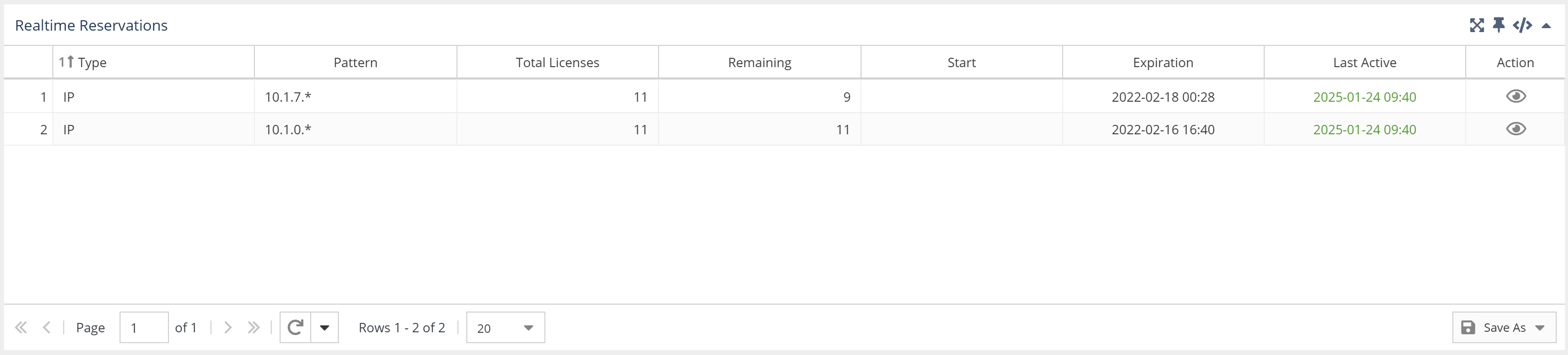

The Feature Reservations grid includes the following columns:
...
If the reservation is active, you can click the view icon under the Action column to see a list of open a window that lists the user sessions that match the reservation.

| Info |
|---|
Note that this is only an approximate list of sessions that match the reservation pattern. Based on available data it's not always possible to determine if the specific session uses a specific reservation. This list may contain more sessions matching the pattern than really used from the reserved pool. |
On the grid below you can see the list of all sessions matching the pattern. License Statistics matches the reservation pattern to the sessions using the following types:
- User
- User Group
- Host
- Host Group
- IP
- Autodesk ID*
...
| Warning |
|---|
* Due to Autodesk introducing stricter technical measures to actively prevent third-party access to their cloud license data, we are currently unable to provide Autodesk cloud-based license monitoring via their web portal at manage.autodesk.com. (See Autodesk usage monitoring for more details.)Existing Autodesk cloud-based data will be retained; however, until we reintroduce some cloud-based data collection capabilities in a future License Statistics release, new or changed data for Autodesk cloud-based license information will not be collected. |
...