...
The information on this page refers to License Statistics v6.24 and newer, which changed "LDAP" labels to the generic label "User Directory." If you are using a version previous to v6.24, see documentation for previous versions. |
To access User Directory configuration settings, select User Directory under the Administration section. (This page is visible only for License Statistics administrator users.) The following sections describe how to configure User Directory using the configuration page. Also see Importing User Directory user groups for more details on this topic.
...
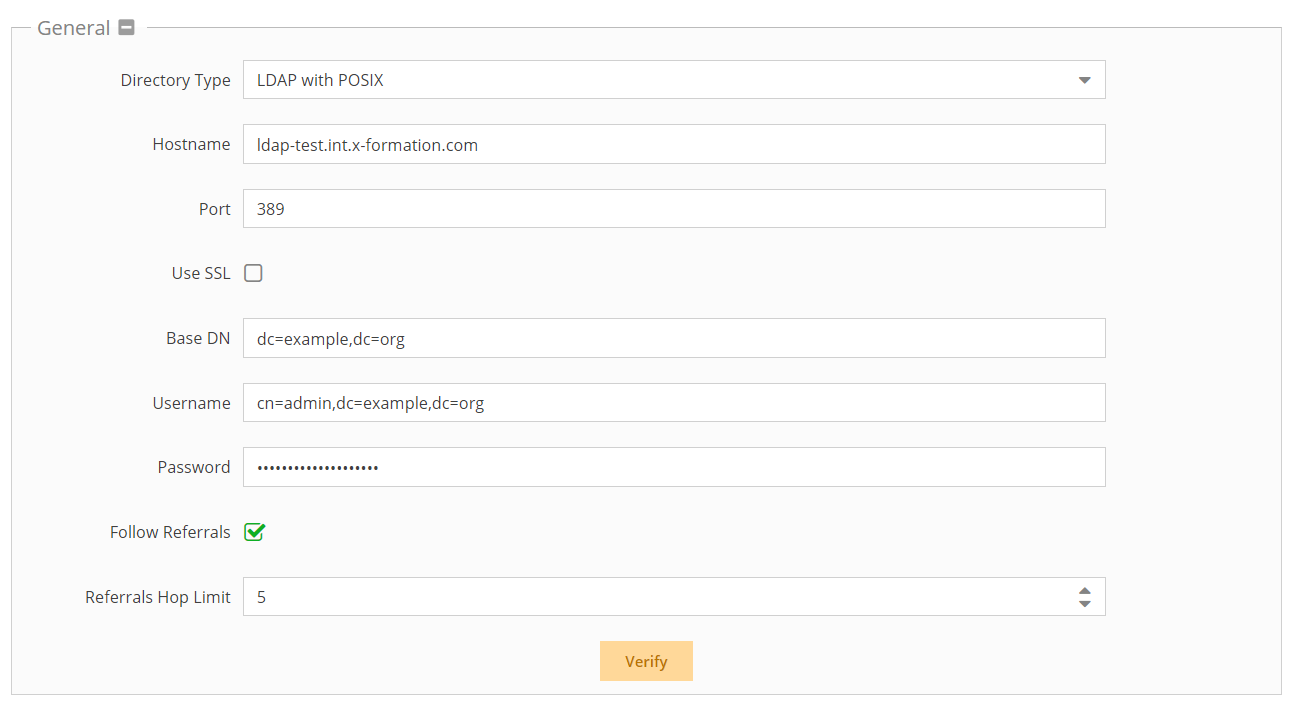
- Enter the appropriate information for connecting to your User Directory server. (An example setup is shown in the screenshot below.)
- Directory type: Select from Active Directory (default), LDAP, or LDAP with POSIX. Your selection will populate the schema settings with the defaults for that selection, which can then be customized if needed.
- Hostame: The hostname of the User Directory server.
- Port: The port for the User Directory server. The default is 389.
- Use SSL: Check this box if you would like to connect to your User Directory server over SSL protocol. If using SSL, see Enabling User Directory over SSL for further setup information.
- Base DN: The base DN (Distinguished Name) under which to search for users and groups. (See Testing User Directory settings for more information on obtaining the base DN.)
- Manager DN: The DN for the manager account to be used for initial binding (authentication).
- Password: The password for the manager account.
- Follow Referrals: Check this box to use follow referrals, which allows navigating through the User Directory tree structures to find information that may be split into multiple servers. Note that enabling this setting may decrease performance. See https://httpd.apache.org/docs/trunk/mod/mod_ldap.html#ldapreferrals for detailed information about follow referrals.
- Referrals Hop Limit: Sets the limit on the number of referral hops to perform before the User Directory query is terminated. A higher Referrals Hop Limit lets you search more deeply for information on large networks, but reduces performance.
- Click Verify to ensure that your connection to the User Directory server works as expected. A message will indicate whether the test was successful. If the test is not successful, make the needed changes to the setup, save the changes, and retest the connection. (See Testing User Directory settings for more information on verifying your User Directory settings.)
- Click Save at the bottom of the User Directory page to save the User Directory configuration.
...
License Statistics lets you import user details and groups you have defined in a User Directory. Importing your user groups from User Directory eliminates the need to create user groups manually, which can be time consuming if you have a large number of users. For more information, see Importing User Directory user groups.
To enable User Directory import:
...